LM Warden

Your GPUs, served like a hosted API.

LM Warden runs vLLM, llama.cpp or MLX on hardware you own and puts one OpenAI-compatible port in front: a key per app, usage per key, and a live panel for every GPU. On a Linux box with NVIDIA cards, or on an Apple silicon Mac.

Open source, Apache-2.0No account, no telemetryLinux + NVIDIA · macOS (beta) · Windows next

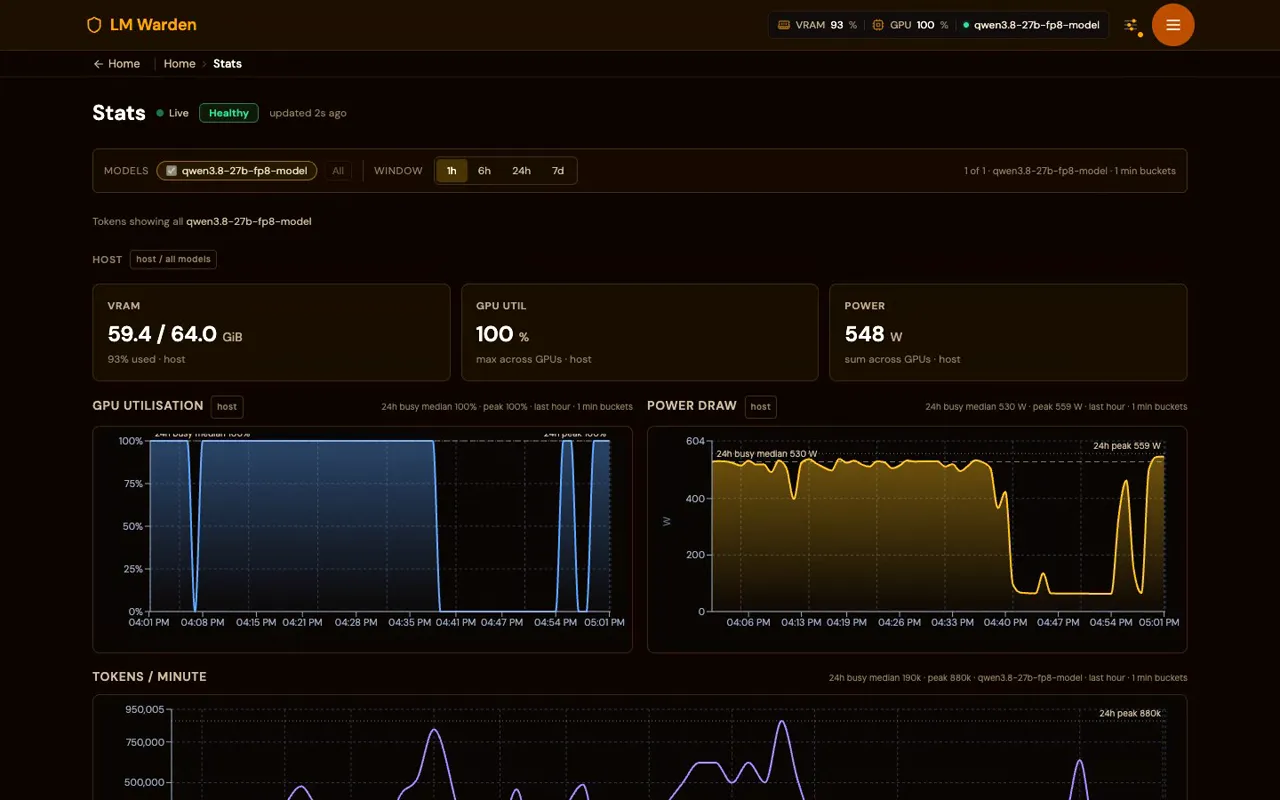
The Stats page of a busy LM Warden instance: VRAM 59.4 of 64 GiB, GPU utilisation 100%, power 548 W, and charts of GPU utilisation, power draw and tokens per minute over the last hour
  • Linux · NVIDIA vLLM v0.32.0 and llama.cpp b11719 on CUDA
  • macOS · Apple silicon MLX and llama.cpp on Metal
  • APIs OpenAI, Anthropic Messages and Responses on one port
  • Coding agents Claude Code, Codex CLI, OpenCode and 7 more configured for you

What people use it for

Where will you run it?

Choose a platform above to see its steps, or show all four.

One command on the GPU host.

curl -fsSL https://raw.githubusercontent.com/Podwarden/lm-warden/main/install.sh | sh -s -- --dir /opt/vllm-warden
  • x86_64 host, Docker Compose v2.24+, the NVIDIA Container Toolkit, a Turing-or-newer card.
  • Then open http://HOST:8080/ui/, finish the first-run wizard, add a model, mint a key. Your endpoint is http://HOST:8080/v1.
  • Several GPUs in one box: tensor parallel, or one replica per card with cache-aware routing.
  • NVIDIA today. AMD ROCm and Intel GPU support are coming soon; no dates yet. Tell us which you would run it on: Radeon · Intel.
  • Install guide · Offline / air-gapped · From source · Upgrading
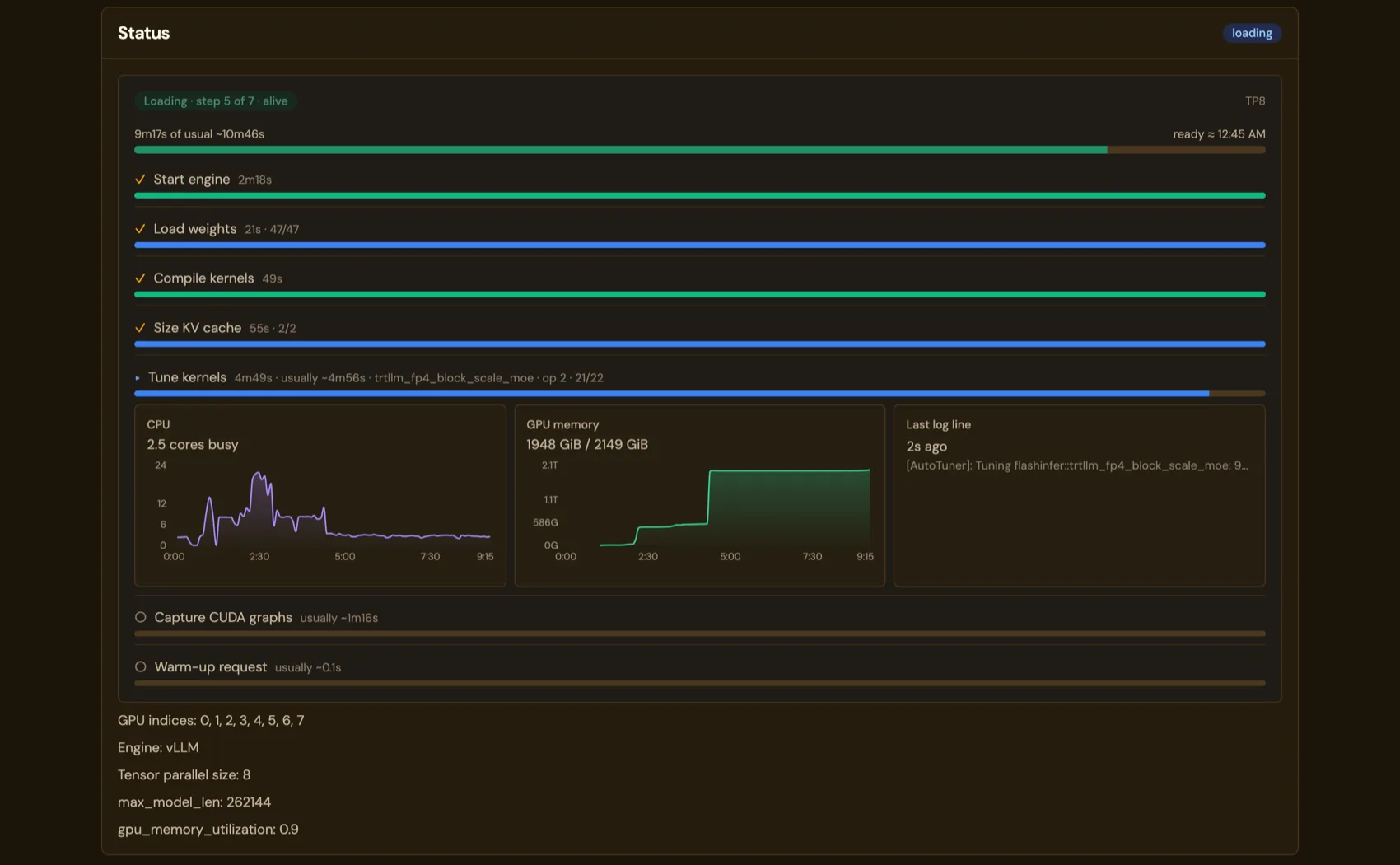
A model load in progress on the Models page, each step with its elapsed and usual time
A model loading after install: each step with the usual time from earlier loads.

A menu-bar app, in beta.

Download for Mac (beta)

  • About 110 MB. Apple silicon (M1 or later), macOS 14 or later. SHA-256 · release notes.
  • Engines: MLX and llama.cpp built with Metal. The same dashboard and the same OpenAI API; no vLLM, no power reading.
  • Beta, plainly: ad-hoc signed and not notarized, so macOS asks you to allow it under Privacy & Security on first launch; updates are a new download. First-launch steps.
  • Serves on 127.0.0.1 until you choose Share on Local Network.
  • Coming soon: mlx-rust-lm, a third engine. The LM Warden team is porting Apple’s mlx-lm from Python to Rust on Apple’s official mlx-c bindings; it will run beside MLX and llama.cpp and in time replace the Python mlx-lm engine, which with Python and its libraries is most of today’s download. Unofficial, not affiliated with Apple.
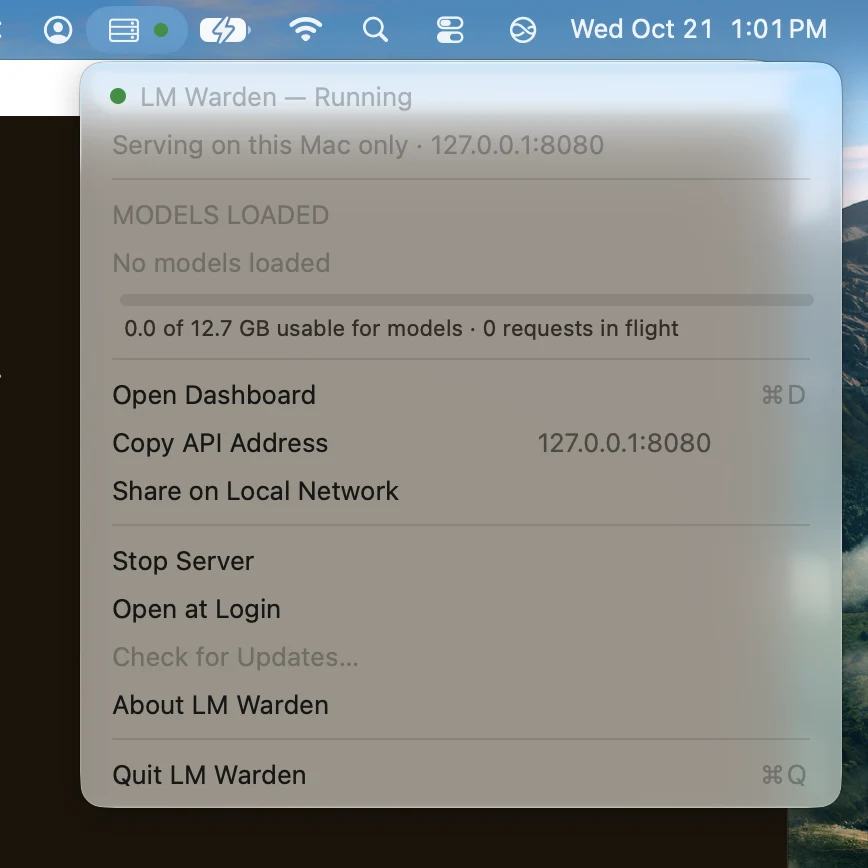
The LM Warden menu-bar menu on a Mac: Running, serving on this Mac only at 127.0.0.1:8080, no models loaded, a memory bar, Open Dashboard, Copy API Address, Share on Local Network
The menu-bar menu of the beta on a 16 GB M1.

Windows is next. There is no date.

We are building it now and will put a build here the day it exists, not a sign-up form before. Until then, two honest options:

  • Run LM Warden on a Linux GPU box and use it from Windows: every OpenAI client, Claude Code and Codex connect over the network.
  • Watch releases on GitHub to hear about the first Windows build.
  • AMD Radeon and Intel GPUs come after; tell us which you would run it on: Radeon · Intel.

The appliance: coming soon, no date.

A fourth way to run LM Warden, for a box that should do nothing else.

  • You put a USB drive into a chassis with GPUs. It installs a stripped-down Linux that does one thing: run LM Warden.
  • It configures networking and storage for models for you.
  • Updates arrive over the air, or the box works fully air-gapped.
  • Made for a secure, dedicated LLM server: a team that wants a locked-down box, or a site with no route out.

Until it ships, the Linux install above does the same job on a host you set up yourself, including the offline / air-gapped install. Watch releases on GitHub.

No picture yet: there is no product name or hardware to show, and we will not draw one.

Already running it? Linux upgrades in place: pull the new images, restart, the database migrates forward. Steps · Changelog.

Self-hosting has eight problems. Here is what each one looks like solved.

A bare engine serves one model on one port. These are the parts around it, with our own numbers where we have them.

  1. Will this model fit my GPU?

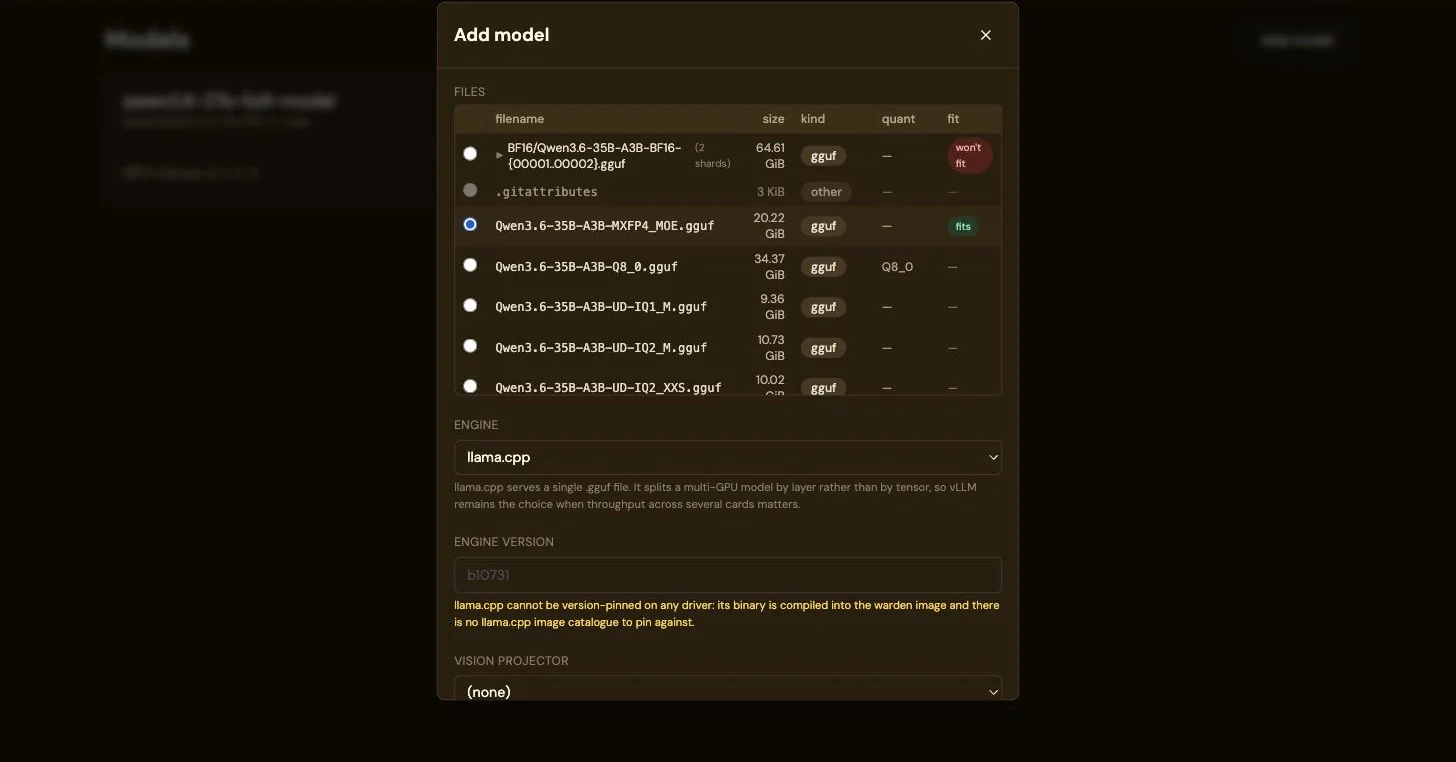
    Paste a Hugging Face repo into Add model. Every file is listed with a verdict against the cards you tick: fits, tight headroom, or won’t fit. Tick more cards and the budget adds up. Nothing downloads until something fits.

    The same 20.22 GiB file marked as fitting once four GPUs are selected
  2. You bought GPUs. Are they working or waiting?

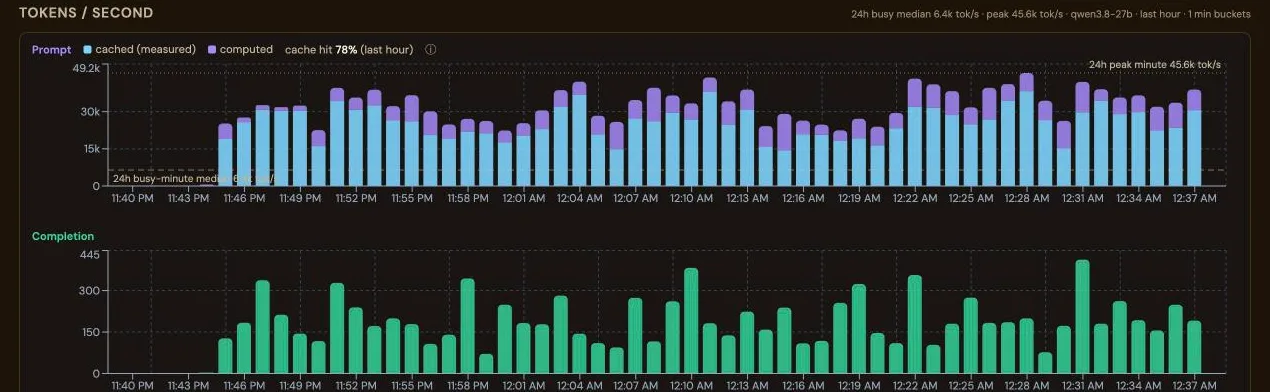
    Throughput is concurrency × prompt length × cache reuse, and a bare engine shows none of it together. The Stats page does, over 1 h to 7 d: VRAM, GPU utilisation, power (Linux), tokens per second with prompt tokens split into cached and computed, p50/p95 latency, prompt-cache hit rate, preemptions, requests per key and per client IP. Flat utilisation with a queue says “more concurrency”; a low cache share says “pin sessions”.

    Tokens per second: prompt tokens split into cached and computed, completion tokens below
  3. Talk to the model before you wire anything up.

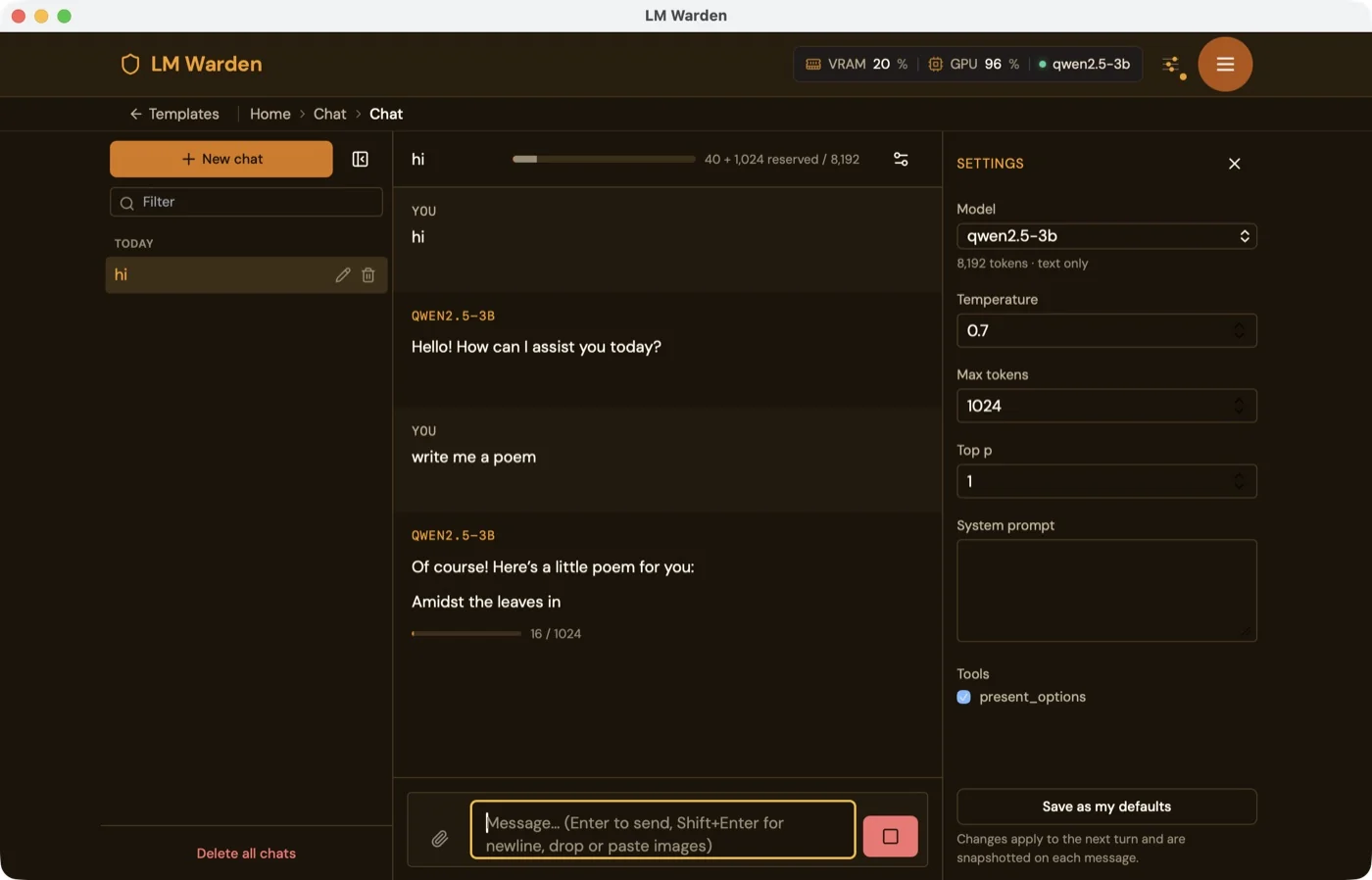
    The chat is in the same window as everything else. Streaming Markdown with highlighted code and maths; up to eight PNG, JPEG or WebP images per message for a vision model; temperature, top-p, max tokens and system prompt per chat, saved as defaults; chats kept, titled, forkable. Tool calls the model makes are rendered, so you can check tool calling before an agent depends on it.

    The chat in the Mac app’s dashboard window, streaming from qwen2.5-3b with GPU 96% in the header
  4. What did the model actually see, and say?

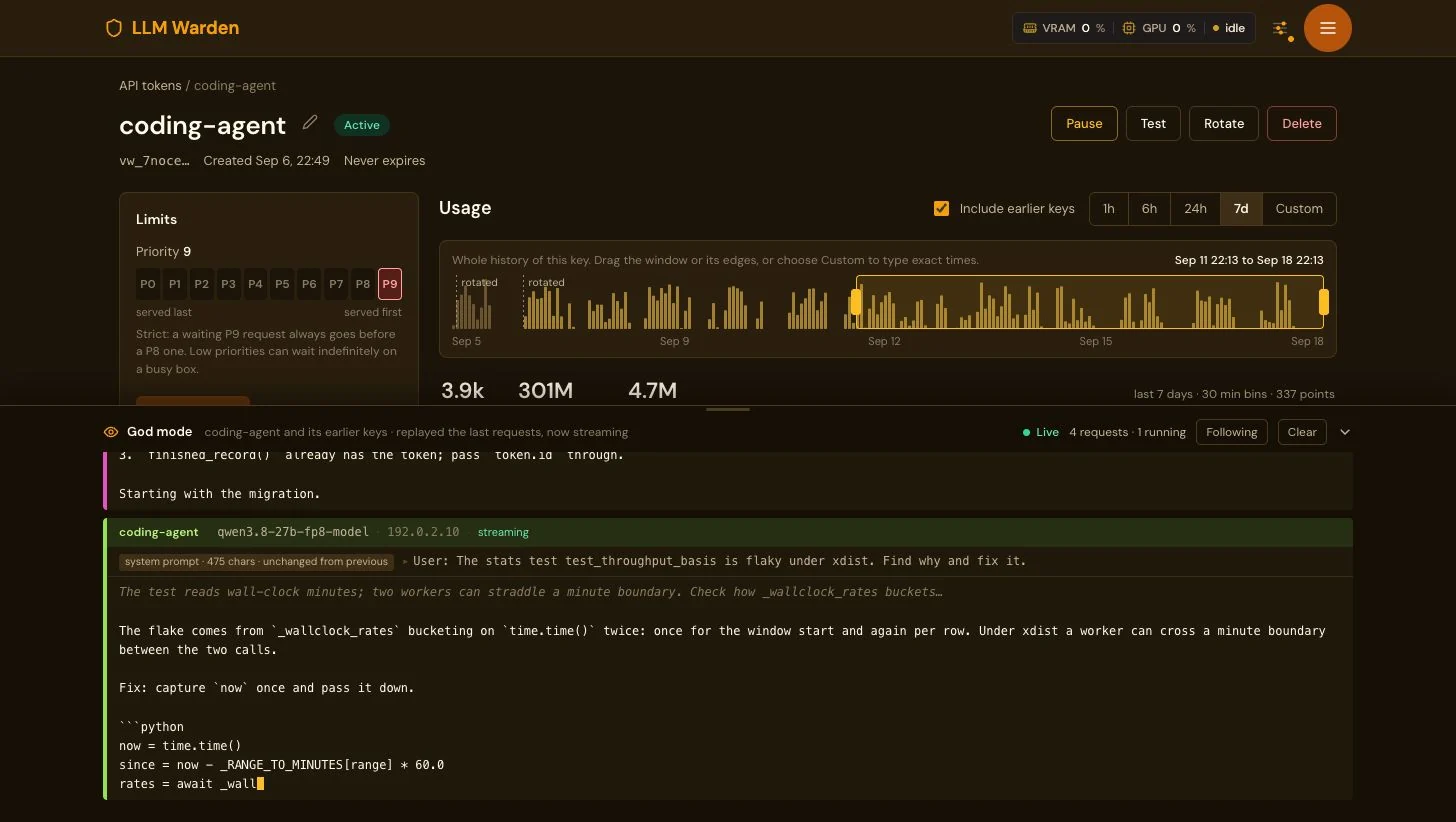
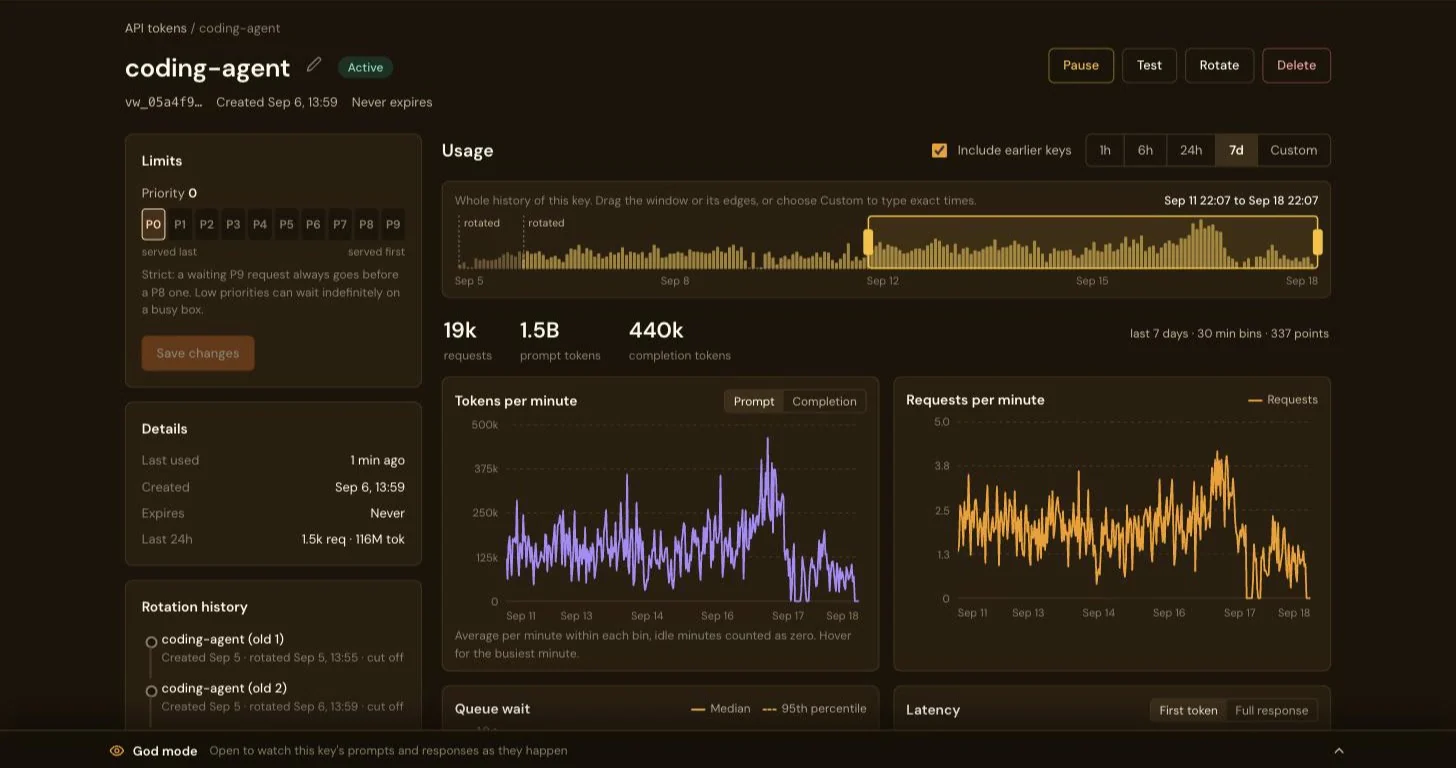
    God mode, for debugging prompts: with VW_GODMODE_ENABLED on the deployment, each key’s page gets a dock that streams that key’s prompts and completions live. Off by default, and absent when off. A bounded in-memory ring: nothing to the database or disk, gone on restart. Anyone with the admin session can open it; the warden has one admin role and no others.

    The page of the API key coding-agent with the God mode dock open along the bottom: Live, 4 requests, 1 running; a qwen3.8-27b-fp8 request from 192.0.2.10 streaming, showing the user prompt about a flaky stats test and the model’s reply with a Python fix as it is written

Every agent turn re-reads the whole conversation.

An agent resends its whole history every turn, so a long conversation is mostly a prefix the engine has already read. vLLM keeps that work in its prefix cache, but only on the replica that did it, and its own balancer sends each turn to whichever replica has the shortest queue. LM Warden places each new conversation on the least-loaded replica and keeps it there, using the session id Claude Code already sends. It moves a request only when that replica passes its spill threshold.

Why affinity: one conversation over four turnsTwo panels of four replicas. First: each of four turns of one conversation lands on a different replica and is almost entirely prefilled from scratch. Second: all four turns stay on one replica and only the new turn is prefilled; the rest is served from the prefix cache.served from the prefix cacheprefilled from scratchvLLM’s balancer: a turn lands anywherereplica 0replica 1replica 2replica 3t1t2t3t4prefilled again: about the whole history, every turnLM Warden: a conversation stays on its replicareplica 0replica 1replica 2replica 3t1t2t3t4prefilled again: only the new turn
Why affinity: one conversation over four turnsTwo panels of four replicas. First: each of four turns of one conversation lands on a different replica and is almost entirely prefilled from scratch. Second: all four turns stay on one replica and only the new turn is prefilled; the rest is served from the prefix cache.served from the prefix cacheprefilled from scratchvLLM’s balancer: a turn lands anywherereplica 0replica 1replica 2replica 3t1t2t3t4prefilled again: about the whole history,every turnLM Warden: a conversation stays on its replicareplica 0replica 1replica 2replica 3t1t2t3t4prefilled again: only the new turn
Four turns of one conversation on a four-replica model. With vLLM’s balancer, each turn is prefilled (its prompt read into the cache) almost from scratch on whichever replica got it. With LM Warden, the conversation stays on replica 2 and only the new turn is prefilled. A drawing of the mechanism, not a measurement.

Measured on our four-card box (4 × RTX A4000, Qwen3-4B as four one-card replicas, synthetic Claude Code-style sessions, affinity off then on, back to back): with conversations pinned, the share of prompt tokens served from the cache rose from 56 to 86% at 4 concurrent sessions, and the median time to first byte fell from 2.05 to 0.38 s. Output tokens a minute were higher at every step we ran, and the p95 time to first byte (the slowest 5%) was lower at every step. The number of replicas doing work barely moved (2.71 against 2.83 of four at 4 sessions): the gain is reuse of the cache, not more cards working.

Prefix-cache hit rate by concurrent sessionsShare of prompt tokens served from the prefix cache in each step, all four replicas pooled, affinity on against vLLM’s balancer: 4 sessions 56.2% off, 86.4% on; 8 sessions 44.3% off, 86.1% on; 16 sessions 33.2% off, 48.6% on; 24 sessions 32.8% off, 37.9% on; 32 sessions 31.6% off, 31.6% on.affinity onvLLM balancerPrefix-cache hit rate0255075100% of prompt tokens48162432concurrent sessionsvLLM balancer, 4 sessions: 56.2%vLLM balancer, 8 sessions: 44.3%vLLM balancer, 16 sessions: 33.2%vLLM balancer, 24 sessions: 32.8%vLLM balancer, 32 sessions: 31.6%vLLM balanceraffinity on, 4 sessions: 86.4%affinity on, 8 sessions: 86.1%affinity on, 16 sessions: 48.6%affinity on, 24 sessions: 37.9%affinity on, 32 sessions: 31.6%affinity on
Prefix-cache hit rate in each step: prompt tokens served from the cache over prompt tokens asked for, all four replicas pooled, from the change in vLLM’s own counters over the step. The gain holds while there is headroom and is gone at 32 sessions, where conversations spill.
Time to first byte by concurrent sessionsMedian and 95th-percentile time to first byte on the four-card box at 4 to 32 concurrent sessions, affinity on against vLLM’s balancer, on a log scale from 0.3 to 100 seconds. 4 sessions: median 2.05 s off, 0.38 s on, p95 3.5 s off, 2.84 s on; 8 sessions: median 2.33 s off, 0.48 s on, p95 6.32 s off, 5.03 s on; 16 sessions: median 3.25 s off, 0.85 s on, p95 26.24 s off, 24.88 s on; 24 sessions: median 5.06 s off, 13.14 s on, p95 58.82 s off, 38.34 s on; 32 sessions: median 12.32 s off, 27.66 s on, p95 82.84 s off, 38.92 s on.affinity onvLLM balancerTime to first byte, median0.3131030100seconds, log scale48162432concurrent sessionsvLLM balancer, 4 sessions: 2.05 svLLM balancer, 8 sessions: 2.33 svLLM balancer, 16 sessions: 3.25 svLLM balancer, 24 sessions: 5.06 svLLM balancer, 32 sessions: 12.32 svLLM balanceraffinity on, 4 sessions: 0.38 saffinity on, 8 sessions: 0.48 saffinity on, 16 sessions: 0.85 saffinity on, 24 sessions: 13.14 saffinity on, 32 sessions: 27.66 saffinity onTime to first byte, p950.3131030100seconds, log scale48162432concurrent sessionsvLLM balancer, 4 sessions: 3.5 svLLM balancer, 8 sessions: 6.32 svLLM balancer, 16 sessions: 26.24 svLLM balancer, 24 sessions: 58.82 svLLM balancer, 32 sessions: 82.84 svLLM balanceraffinity on, 4 sessions: 2.84 saffinity on, 8 sessions: 5.03 saffinity on, 16 sessions: 24.88 saffinity on, 24 sessions: 38.34 saffinity on, 32 sessions: 38.92 saffinity on
Time to first byte at 4 to 32 concurrent sessions, median and p95, on a log scale so the sub-second steps read beside the minute-long ones. With affinity the median is far lower up to 16 sessions (0.38 against 2.05 s at 4) and higher at 24 and 32; the p95 is lower at every step, though at 16 the gap (24.9 against 26.2 s) is within the noise of one run per arm. Measured at the client, over the internet, to the first streamed token.

Every step of the ramp, affinity off → on

SessionsSessions/h off → onOutput tokens/min off → onTTFB p50 off → on (s)TTFB p95 off → on (s)Replicas busy off → onPrefix hits off → on (%)Stayed on replica (%)
4180 → 2405,886 → 6,7442.05 → 0.383.5 → 2.842.71 → 2.8356.2 → 86.4100
8300 → 3808,364 → 10,7522.33 → 0.486.32 → 5.033.74 → 3.7444.3 → 86.1100
16300 → 3609,558 → 12,2043.25 → 0.8526.24 → 24.883.91 → 3.6933.2 → 48.6100
24300 → 4209,048 → 11,1785.06 → 13.1458.82 → 38.343.91 → 432.8 → 37.989.1
32520 → 62014,760 → 16,63812.32 → 27.6682.84 → 38.924 → 431.6 → 31.667.3

Measured on our four-card box with a small model, affinity off first, then on, without restarting vLLM in between: the second arm started with a warm prefix cache, and both arms drew their prompts from the same seed. Each step lasts 3 minutes, so it completes only 9 to 31 sessions and one session more or less moves sessions an hour by 20; output tokens a minute is the steadier column. Your model, cards and workload will differ; the replica card on a model’s page shows the same counters for yours.

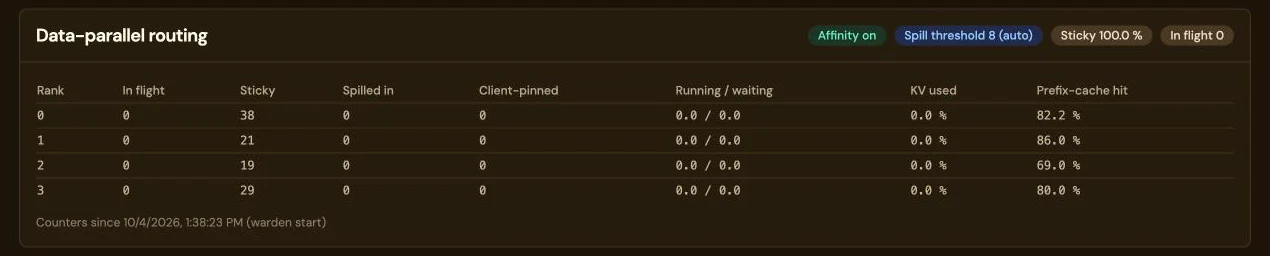
The Data-parallel routing card on a model’s page, with the pills Affinity on, Spill threshold 8 (auto), Sticky 100.0% and In flight 0. A table lists replicas 0 to 3 with in flight, sticky (38, 21, 19 and 29), spilled in, client-pinned, running and waiting, KV used and prefix-cache hit rate (82.2, 86.0, 69.0 and 80.0 percent), and a line saying the counters run since the warden started.
The same counters on a model’s page: one row per replica with the requests it holds, how many conversations stayed (sticky) or arrived by spilling, what is running and waiting, KV cache in use and the prefix-cache hit rate. Recorded on 4 October 2026 with affinity on and the spill threshold at 8 (auto): sticky 100%, and a prefix-cache hit rate of 82.2, 86.0, 69.0 and 80.0% on replicas 0 to 3. It is the card, not a result. Tap the card to enlarge it.

Where it loses. The 24 and 32 session steps are a deliberate overload of four small cards, and every replica is saturated. Output is still higher (11,178 against 9,048 and 16,638 against 14,760 tokens a minute) and the slow tail is much shorter (p95 38 against 59 s, and 39 against 83 s), but the median time to first byte is worse with affinity: 13.1 against 5.1 s at 24 sessions, 27.7 against 12.3 s at 32. We have not isolated why, and lowering the spill threshold from 8 to 4 did not change it.

Measure both on a busy box. The advantage is largest while there is headroom; a box that runs at its limit should measure both settings, and affinity can be switched off per model. Replicas, and so this routing, are part of the Linux install with NVIDIA GPUs; the Mac app (beta) has no tensor or data parallelism.

The full method: the workload, the harness, the spill threshold and a seven-GPU box that has run with it since →

Point your coding agent at your own GPUs.

Ten harnesses connect with a base URL and a key; two of them can also keep a paid Claude subscription for the hard work.

Keep your Claude subscription, offload the routine calls

Claude Code and the Anthropic SDK, through the router. A rule names the Claude models your GPUs answer for; everything else goes to Anthropic on your own login or key.

Where a Claude Code request goes The agent sends every request to LM Warden’s router. Requests for claude-haiku models go to a model on your GPU and are answered as that model. Every other model, Opus included, is passed to Anthropic on your own login. Claude Codeor Anthropic SDK LM Warden routerrules, first match winsyour key stays yours claude-haiku* your GPUanswers as that model everything else,Opus included Anthropicon your own login Where a Claude Code request goes The agent sends every request to LM Warden’s router. Requests for claude-haiku models go to a model on your GPU and are answered as that model. Every other model, Opus included, is passed to Anthropic on your own login. Claude Codeor Anthropic SDK LM Warden routerrules, first match winsyour key stays yours claude-haiku* everythingelse, Opusincluded your GPUanswers as that model Anthropicon your own login
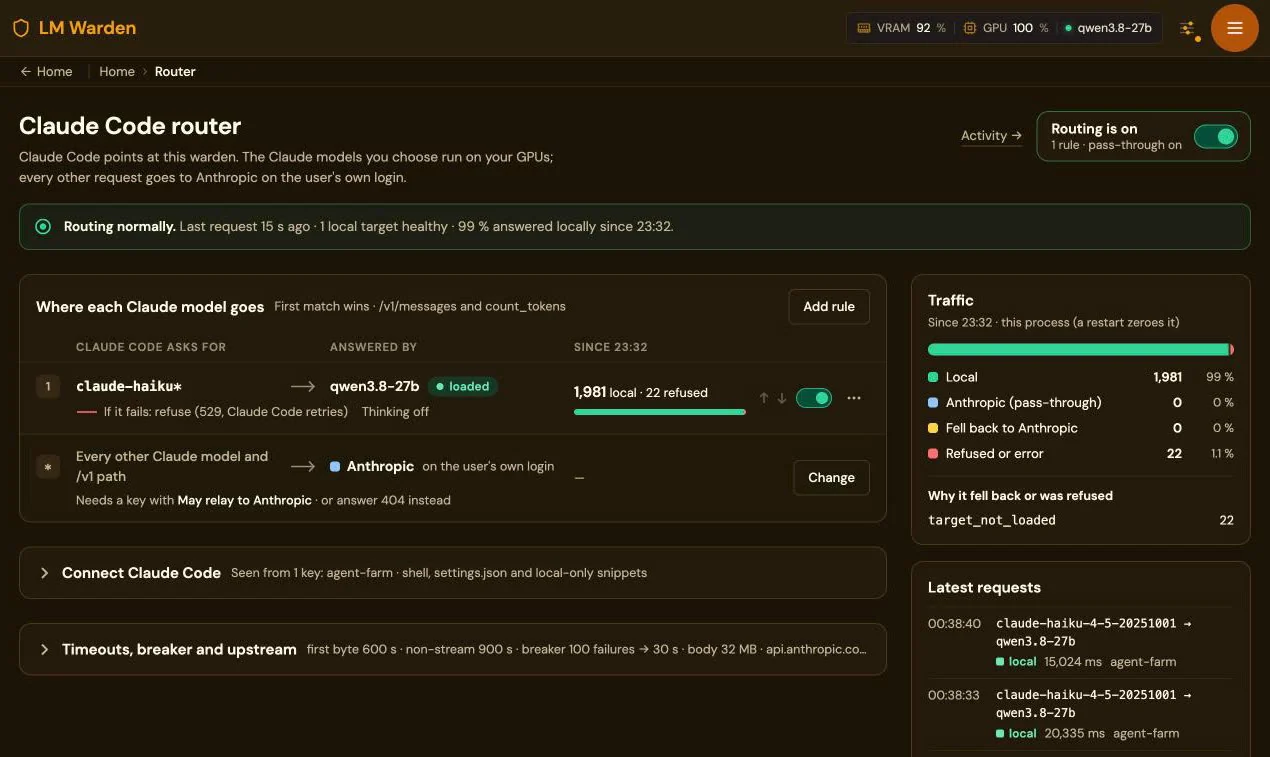
1,981requests answered locally, 99% of the box’s Claude Code traffic since its restart. From the Router page of our own seven-GPU box, 21 October 2026; 22 refused while the target was not loaded.
The Claude Code router page: routing is on, 99% answered locally since 23:32; rule 1 sends claude-haiku* to qwen3.8-27b, 1,981 local and 22 refused; every other Claude model goes to Anthropic on the user’s own login
Claude Code 2.1.227 or newer: ANTHROPIC_BASE_URL to the warden, the warden key in ANTHROPIC_CUSTOM_HEADERS, your login untouched. We have not benchmarked answer quality: give the local model the routine, well-specified work.

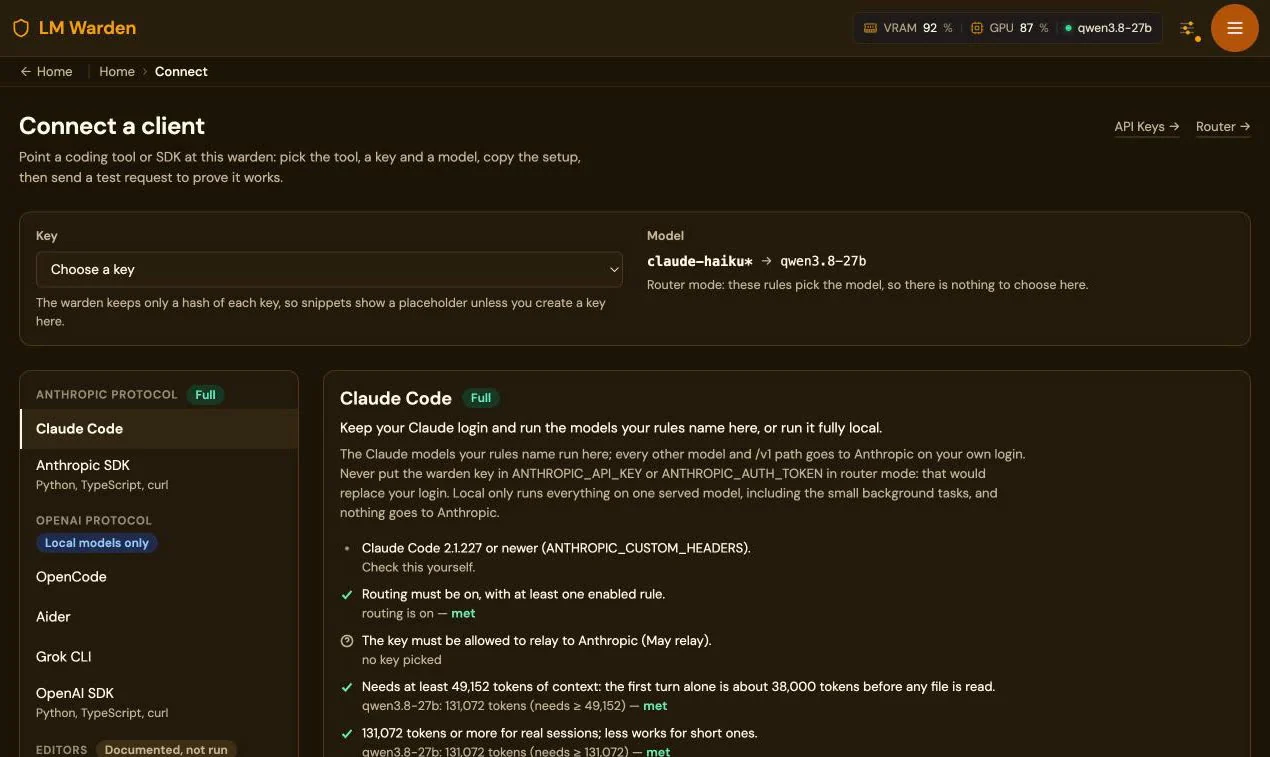
Connect writes each client’s config and sends a test request.

Pick the client, a key and a loaded model in the console; it checks each requirement against what is actually loaded (context window, tool calling, router on) and gives you the files to paste. All coding agents, one page per client with what works and what we saw.

The Connect a client page: a key picker, the router rule claude-haiku* to qwen3.8-27b, clients grouped by protocol, and the Claude Code panel with its requirements checked

Let the AI you already pay for tune your own GPUs.

Choosing a model for your cards means choosing a quantisation, an engine, how to split it across GPUs, how much context to give it and the KV-cache type; each guess costs a download and a load. Everything the console does is an API call, so Claude Code, Codex or another agent with a shell can run that search for you, on your hardware, against your workload.

The loop

The tuning loop Survey the GPUs, shortlist models with fit-preview before any download, load candidate layouts, benchmark them with real requests, adjust the settings, and keep the winner loaded. Benchmark and adjust repeat until the agent is satisfied. 1 Surveyyour GPUs 2 Shortlistfit-preview first 3 Loadcandidate layouts 4 BenchmarkTTFT, tokens/s 5 Adjustone thing at a time repeat until it stops improving 6 Keepthe winner The tuning loop Survey the GPUs, shortlist models with fit-preview before any download, load candidate layouts, benchmark them with real requests, adjust the settings, and keep the winner loaded. Benchmark and adjust repeat until the agent is satisfied. 1 Surveyyour GPUs 2 Shortlistfit-preview first 3 Loadcandidate layouts 4 BenchmarkTTFT, tokens/s 5 Adjustone thing at a time repeat until it stops improving 6 Keepthe winner

What the agent calls: GET /api/system/gpus, POST /api/models/fit-preview before any download, register and suggest-config, pull and load, a stress run that finds and applies the real context ceiling, GET /api/stats/v2/throughput and latency, and an inference key it issues to send test traffic. It reads /agent-guide.md first, a short description of these calls written for a language model.

A model load in progress on the Models page: each step with its elapsed and usual time
What the agent watches while a layout loads: each step with the usual time from earlier loads. A load that stops making progress is stopped and its GPUs freed.

Four prompts to paste, and what comes back

  1. Survey and shortlist. Ask: list my GPUs, shortlist three open-weight models for agentic coding that fit with at least 65,536 tokens of context, check each with fit-preview, download nothing. You get: a table of model, quantisation, engine, GPUs, context, and why.
  2. Engine and layout for one model. Ask: decide vLLM or llama.cpp and tensor parallel or data-parallel replicas on my cards; load the best two layouts, send each the same 20 streaming requests, compare at concurrency 1 and 8. You get: time to first token and tokens per second for both, the winner left loaded, the other unloaded, the test key revoked.
  3. Find the real limits and apply them. Ask: stress-run the loaded model, apply the measured context, then benchmark at concurrency 1, 4 and 16 with prompts of about 2k and 30k tokens. You get: the context ceiling written into the model’s settings and a table of time to first token and tokens per second per concurrency and prompt size.
  4. Compare two candidates on your own work. Ask: replay the prompts in ./workload/*.txt against model A and model B at concurrency 4, judge each answer. You get: model-comparison.md with latency, tokens per second, correctness by the agent’s judgement and a recommendation; the recommended model stays loaded.

Before you start. An admin token has full admin rights over the warden (models, keys, settings; there are no narrower scopes yet): give it a short expiry and revoke it in Settings → Access Tokens when the job is done. A stress run deliberately crashes an engine to find its limit: run these prompts on a warden nobody else depends on. Downloads are large; the prompts check fit before pulling, but watch your disk.

Engine and layout choices (vLLM, tensor or data parallel) are the Linux install; on a Mac the choice is MLX or llama.cpp on one GPU. The model doing the tuning can be whichever you already pay for; the model it tunes is the one on your cards. The agent-tuning page: the four prompts in full.

One GPU box, shared by your whole team, your family and your agents.

Create as many API keys as you need and hand them out: a colleague, a family member, a CI job, an agent farm, each with its own key, its own priority and its own usage page. The hardware works for everyone, and the important work is never kept waiting.

Your hardware, honestly: from a Mac to eight B300s.

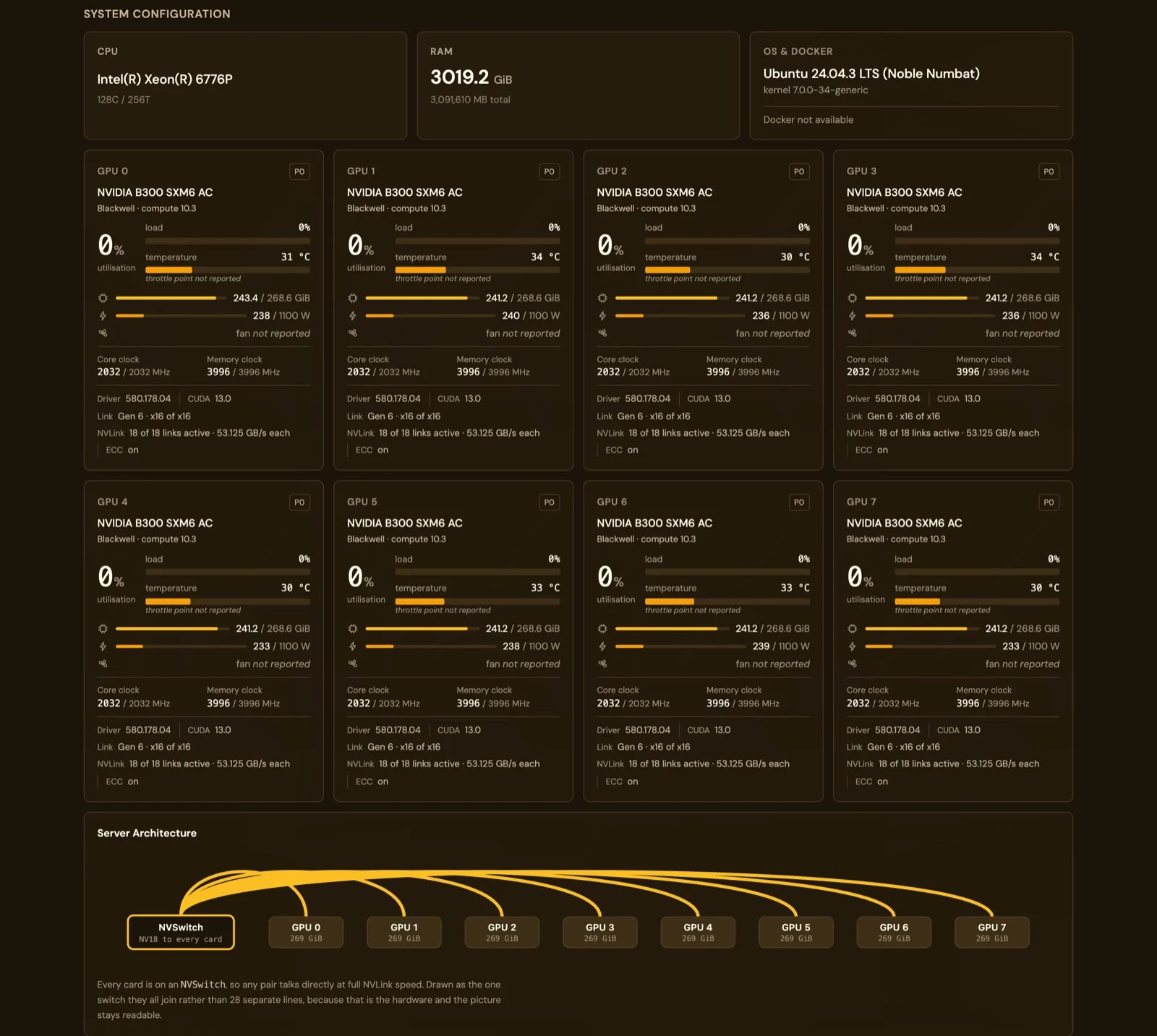
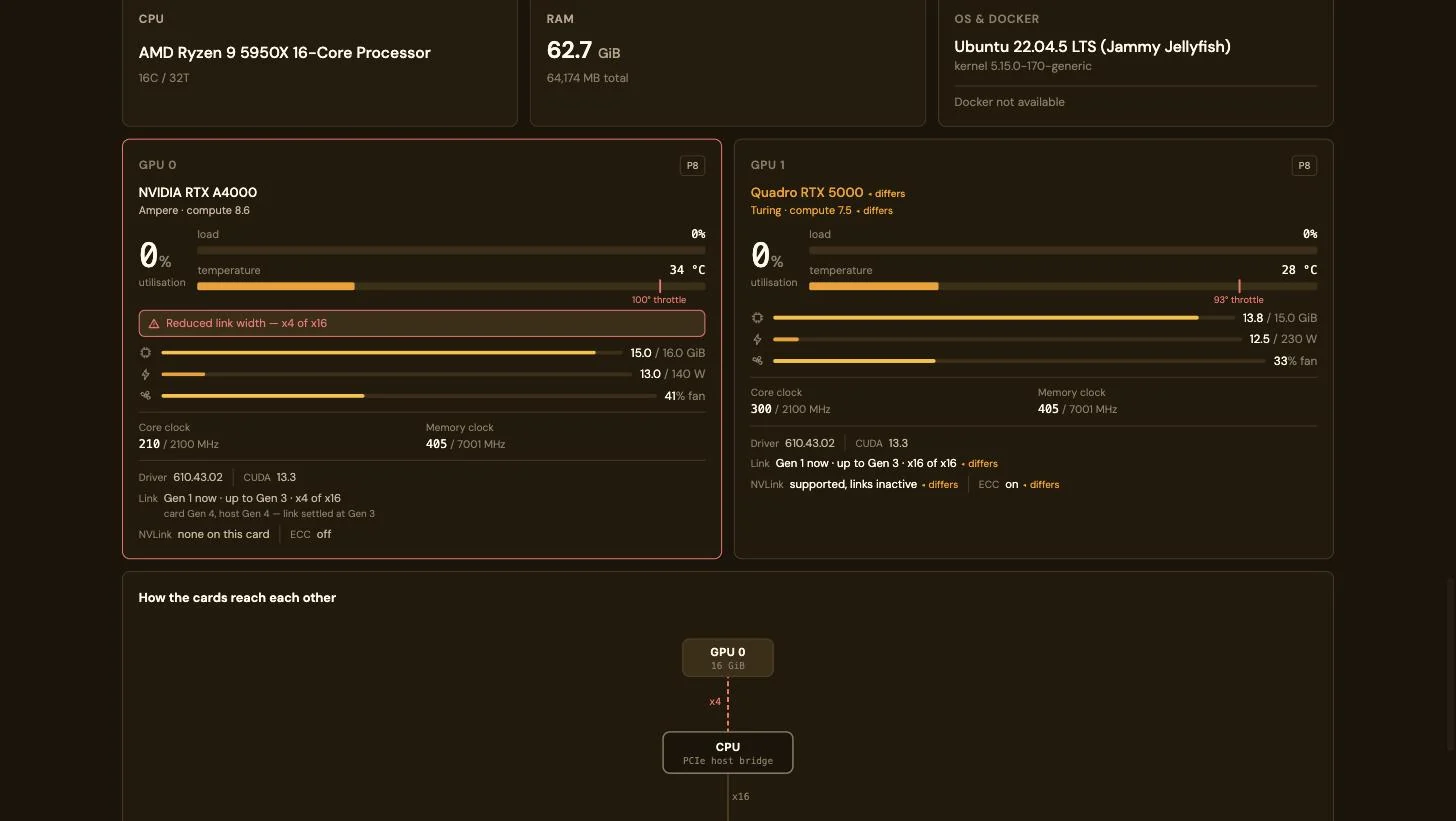
The same console reads a 16 GB M1, two mismatched cards under a desk, and an 8 × B300 NVSwitch server, and it names the bottleneck instead of averaging it away: a PCIe link that settled at x4 of x16, NVLink links that are inactive, ECC that differs between cards.

System configuration on an 8 × B300 server: Intel Xeon 6776P, 3019 GiB RAM, eight NVIDIA B300 SXM6 panels each with 241 of 268.6 GiB in use, Link Gen 6 x16 of x16, NVLink 18 of 18 links active at 53.125 GB/s each, ECC on, and a server-architecture drawing of one NVSwitch joined to every card
Eight B300 SXM6 cards on one NVSwitch: 18 of 18 NVLink links active per card, ECC on, PCIe Gen 6 x16, 241 of 268.6 GiB in use per card while serving GLM-5.2 NVFP4 at tensor-parallel 8.
Two mismatched GPUs: an NVIDIA RTX A4000 with a red Reduced link width x4 of x16 warning and Link Gen 1 now, up to Gen 3, beside a Quadro RTX 5000 whose architecture, VRAM, power cap, link, NVLink and ECC are each marked differs; below, a drawing of how the cards reach the CPU over x4 and x16 links
Two cards bought years apart: the A4000’s link has settled at x4 of x16 and is flagged in red; the Quadro’s architecture, power cap, NVLink (supported, links inactive) and ECC are each marked differs. The drawing shows which slot is the narrow one.
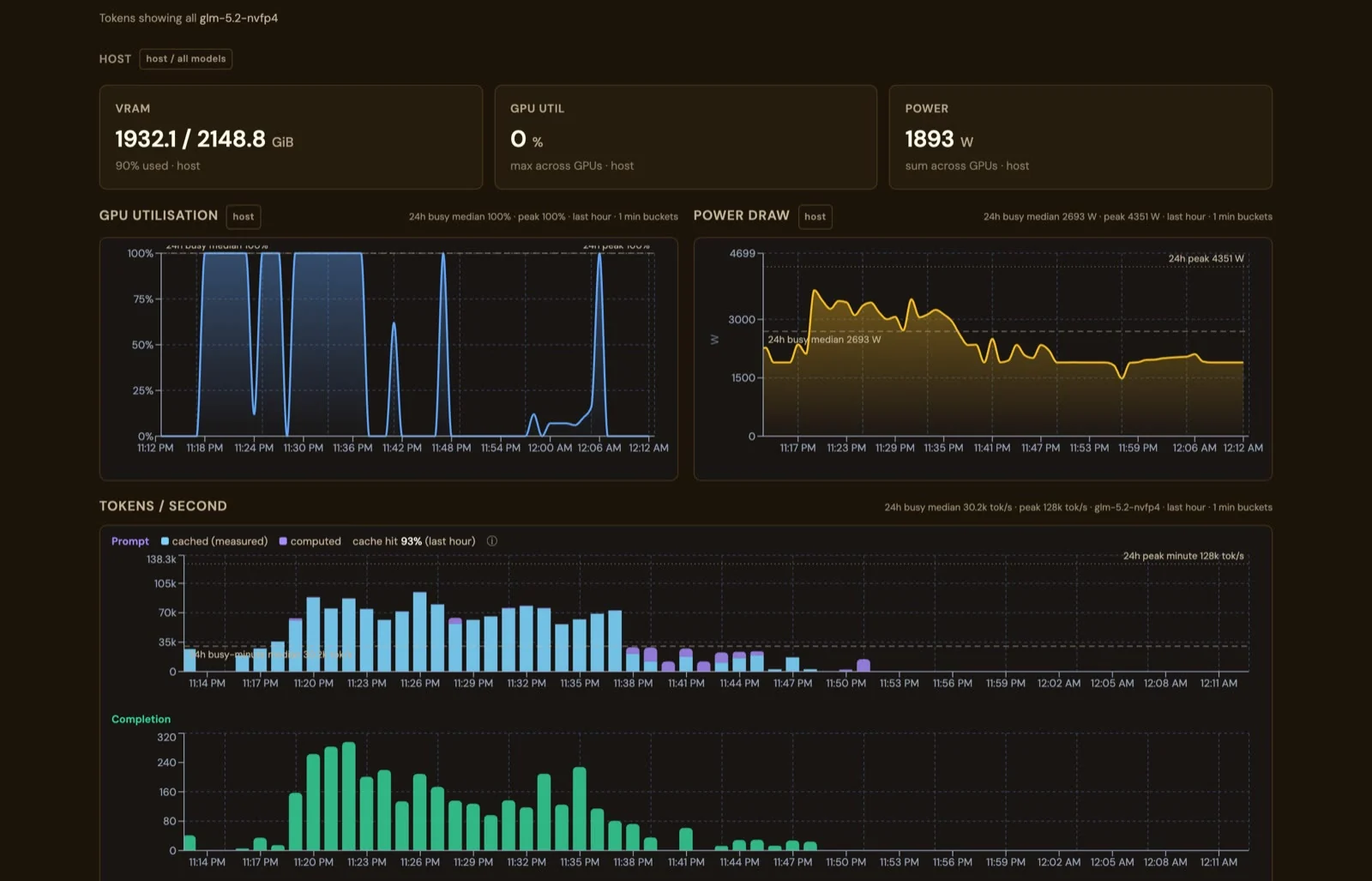
Stats on the 8 × B300 server: VRAM 1932.1 of 2148.8 GiB, power 1893 W summed across the cards, GPU utilisation and power draw for the last hour, and prompt tokens per second split into cached and computed with a 93% cache hit
The same Stats page at the top of the range: 1,932 of 2,149 GiB VRAM, 1,893 W across the cards, a 4,351 W peak in the hour, and 93% of prompt tokens from the cache.
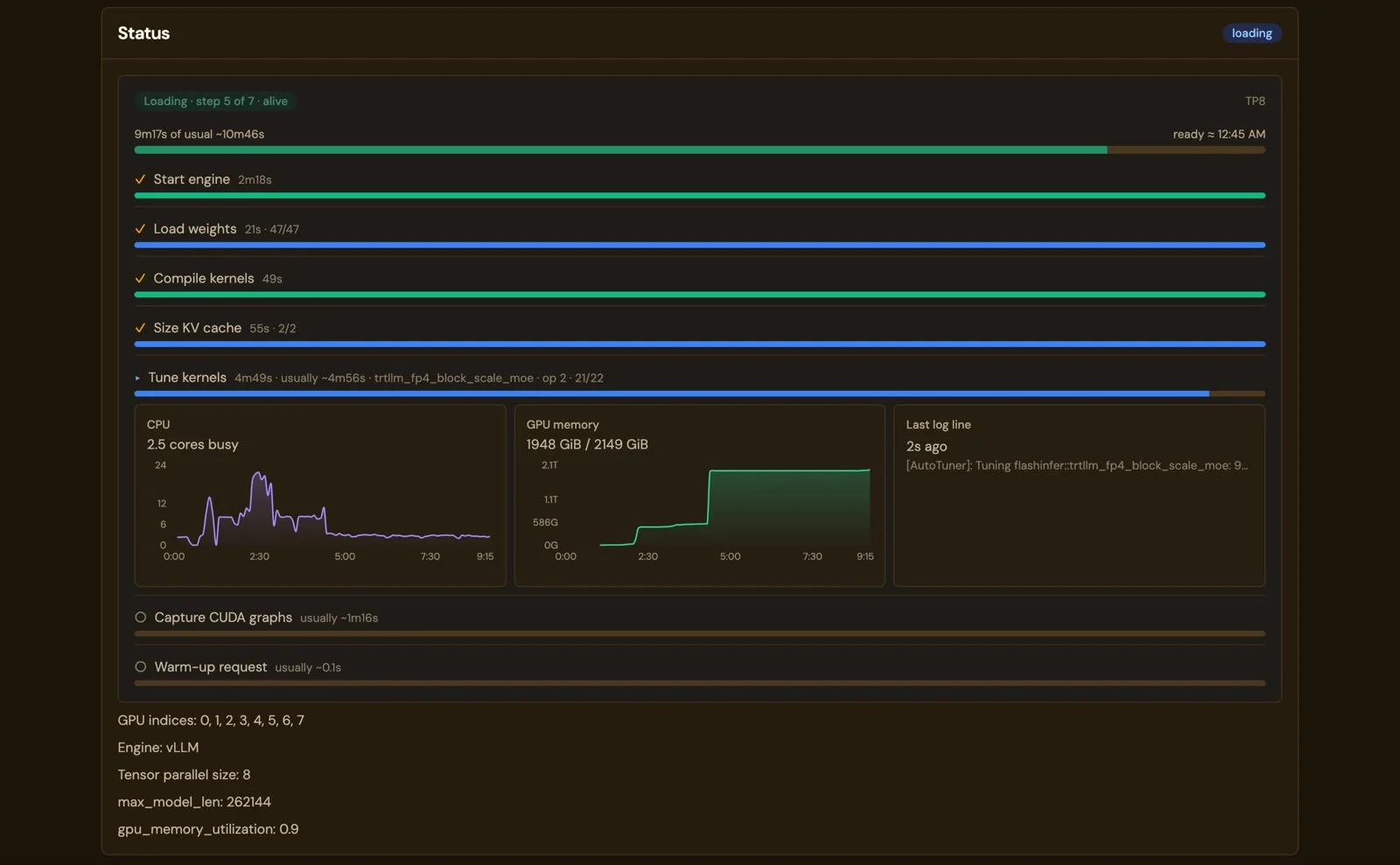
The model page while GLM-5.2 NVFP4 loads on eight B300s: 9 min 17 s into a usual 10 min 46 s, steps Start engine, Load weights 47 of 47, Compile kernels and Size KV cache done, Tune kernels at op 21 of 22, with CPU and GPU-memory charts and the last log line
A 10-minute load, step by step: GLM-5.2 NVFP4 on eight B300s, 9 min 17 s into a usual 10 min 46 s, nothing red while it is still moving.

What each panel shows per card: temperature against its own throttle point, power against its cap, clocks, fan, the PCIe generation and width as negotiated right now, ECC and NVLink when the card has them, and the process holding the memory. The interconnect drawing is read from nvidia-smi topo -m. On a Mac: GPU use and the memory budget Metal reports, without power. And the engine under all of it is watched by its own /health, not its process table: a dead engine under a live wrapper is reloaded with its evidence kept.

What it shows

GPU monitoring

Every card reports for itself.

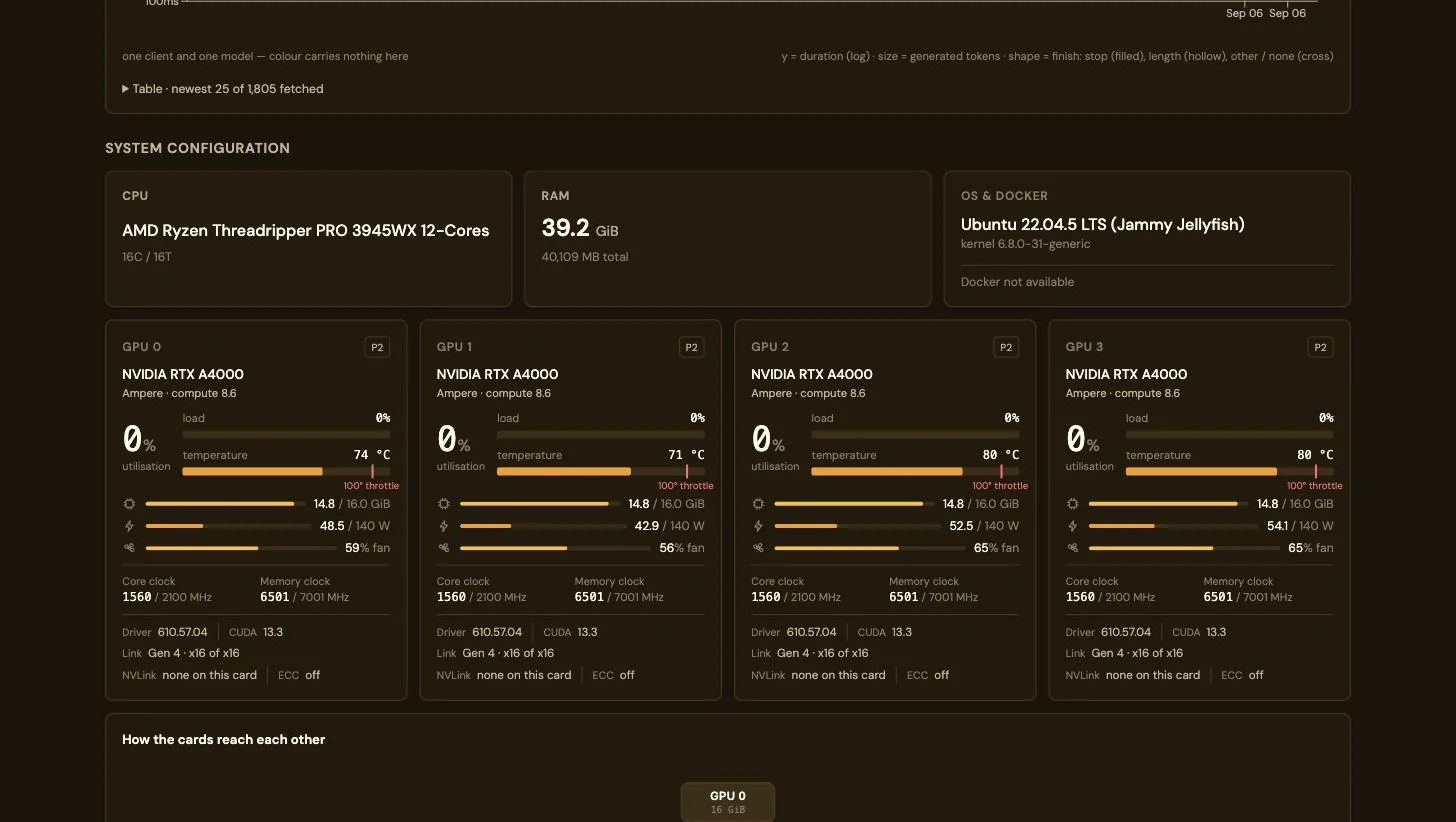
Utilisation, temperature against that card’s own throttle point, power against its cap, VRAM, clocks, PCIe link and which process holds the memory. Not an average across the box.

System configuration and four GPU panels for NVIDIA RTX A4000 cards with per-card utilisation, temperature, VRAM, power, fan and clocks

Requests in flight

See what each agent is doing right now.

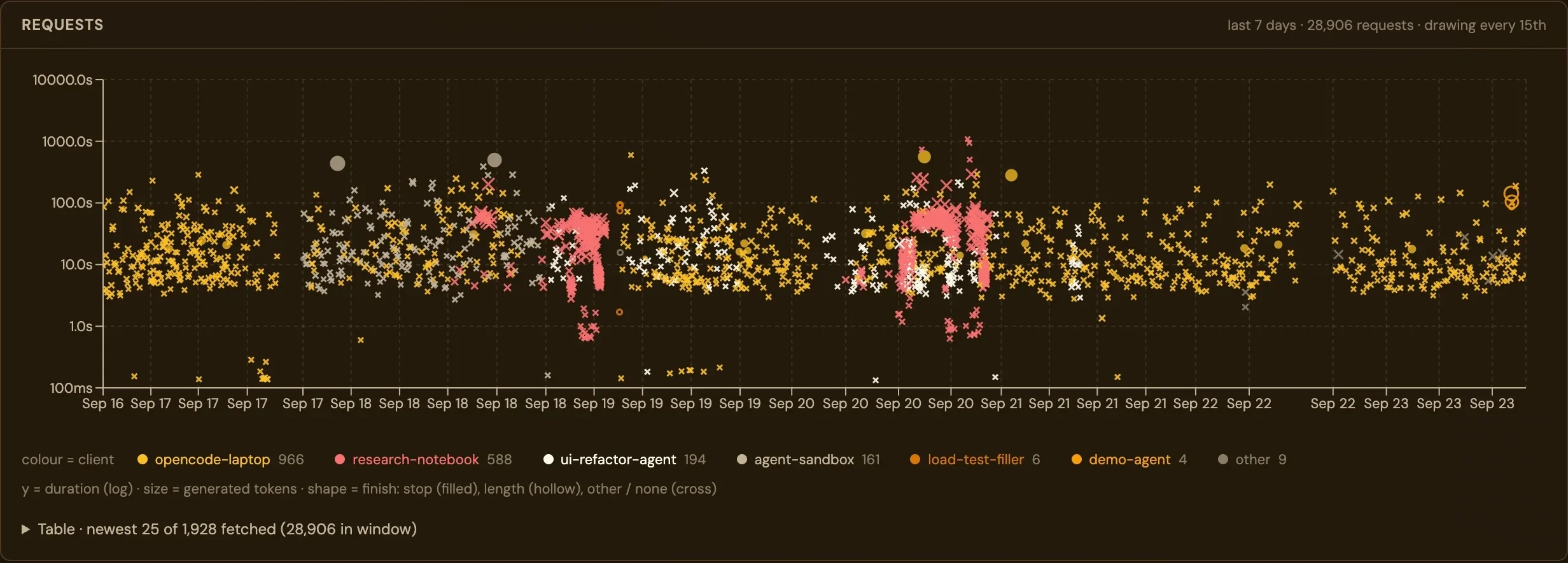
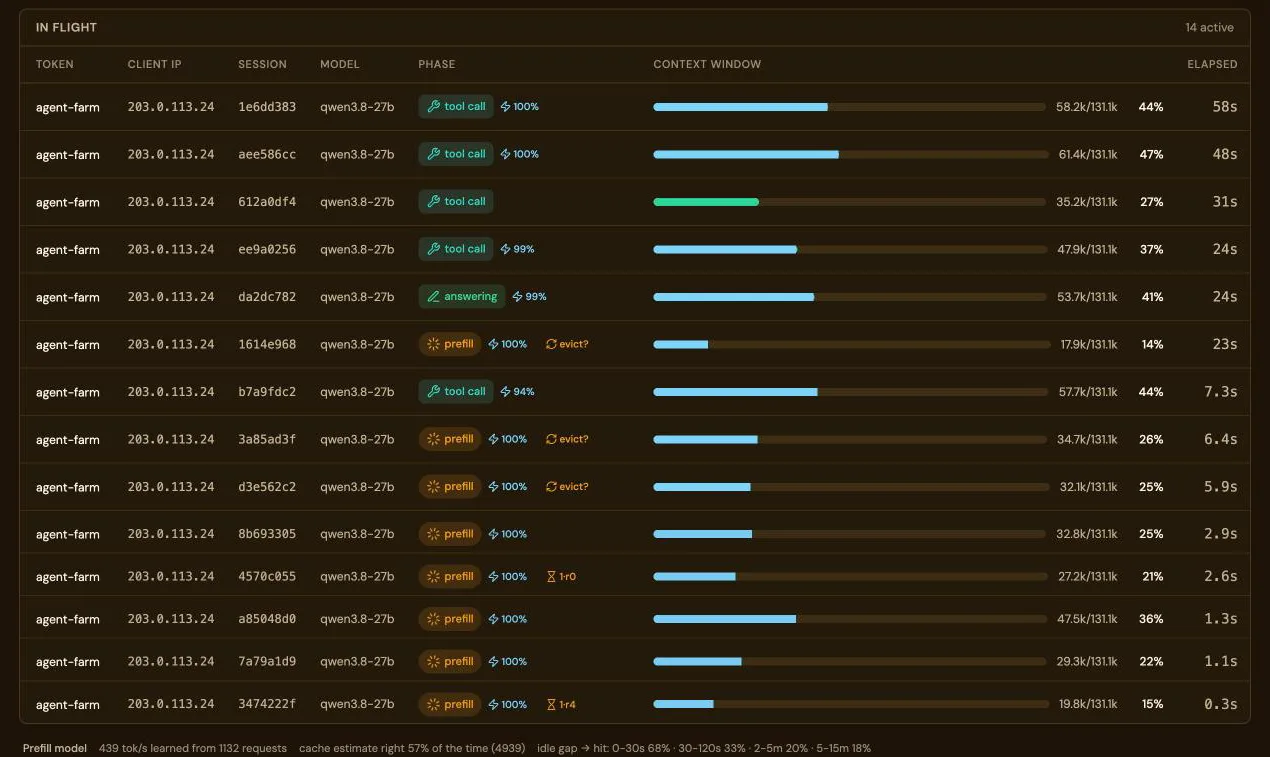
Every request with its key, its session and its phase: queued, prefill, thinking, tool call, answering. How much of each prompt came from the prefix cache, measured per request.

The in-flight requests table: ten active requests, each with key, session, phase and tokens

Coding agents

Claude Code, Codex and OpenCode, connected from one page.

Connect writes each tool’s config with this warden’s address, a key and a loaded model, checks the requirements against what is actually loaded, and sends a test request.

The Connect a client page with Claude Code selected and requirements checked

Free and open source, and built in the open.

LM Warden is Apache-2.0 on GitHub: the install script and the Compose file are the whole deployment, and you can read both. No account, no licence check, no telemetry. vLLM, llama.cpp and MLX are upstream projects we run unmodified.

mlx-rust-lm coming soon

A port of Apple’s mlx-lm from Python to Rust on Apple’s official mlx-c bindings, developed and maintained by the LM Warden team as a standalone open-source project that LM Warden will use as a third Mac engine, eventually replacing the Python mlx-lm engine that makes up most of today’s Mac download. Unofficial, not affiliated with Apple.